New · 5 min read · Updated Oct 28, 2026
Are Your Memphis Security Cameras Recording What You Need?
A live picture is not saved footage. Take five minutes to find yesterday's clip on a Memphis home or business camera, and see how many days you can actually go back.
By CB · MemphiSecurity · Memphis security consultant
Here's something worth checking if you've got security cameras at your home or business. This is a question I ask both homeowners and local businesses on a weekly basis, and about 70% of the time there is a pause, then a look of confusion.
Open your camera app and try to find footage from yesterday afternoon. Not the live picture you're seeing right now, but something that happened several hours ago.
Can you find it?
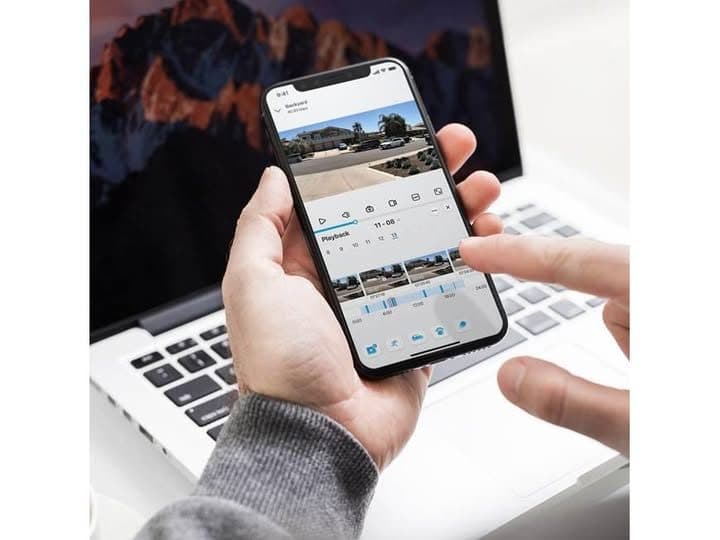
Can you pull up yesterday afternoon?
You might be surprised how many people have cameras that show a perfectly good live picture but aren't necessarily saving the footage they expect.
Motion clips and continuous recording are not the same thing
Some systems record short clips when motion is detected. Others can record continuously, around the clock. Both have their advantages, but they're not the same thing. And whether you're watching the driveway at your Collierville home, the back entrance of a Midtown restaurant, or the parking lot at your East Memphis business, knowing the difference matters.
A Germantown or Cordova house, a Downtown storefront, and an office in Arlington or Lakeland run into the same split. The app can look fine on the live screen either way.
Cloud, an SD card, or a recorder on site
Modern camera systems offer options for both event-based recording and continuous video storage. Depending on the equipment, footage may be saved in the cloud, on an SD memory card inside the camera, or on a separate recorder.
Around Memphis, a monitored home often keeps clips in the cloud—Alarm.com is a common one—while a lot of businesses keep a recorder on site, including Speco-style NVRs. An SD card inside the camera is the third place to look. The live picture does not tell you which one you have. Playback does.
How many days of footage do you actually have?
Here's my suggestion: take five minutes this week and actually review your recordings.
Make sure the cameras are capturing the areas you care about, check how far back you can review footage, and try saving a clip. Take a look at how many days your recorded footage goes back. Most folks need at least two weeks of archived footage, but businesses can go beyond 30 days depending on their industry, liability exposure, and so on.
That two-week home number is what I tell people in Collierville, Germantown, Cordova, and East Memphis when they assume the camera just keeps everything. A Midtown restaurant, a Downtown shop, or a business parking lot often needs the longer archive—30 days or more—because a dispute or a claim may not show up the next morning. Arlington and Lakeland are no different. The timeline in the app is the number that counts.
A five-minute check this week
- Open playback, not the live view, and find yesterday afternoon.
- Confirm the camera still sees the driveway, door, or lot you care about.
- Try saving a clip so you know that works before you need it.
- Count the days on the timeline. Homes: at least two weeks. Businesses: often 30 or more.
Having security cameras is one thing. Knowing they'll give you the footage you need is another. It's important you know where you stand here before you ever need it.
Common questions about camera footage in Memphis
Why can I see live video but not yesterday?
A live picture only proves the camera is on right now. Saved video is a separate setting. Some systems store short motion clips. Others record continuously. If playback is empty, the camera may not be keeping what you expected.
Motion clips or continuous—what's the difference?
Motion recording saves short clips when the camera detects movement. Continuous recording keeps video around the clock. Both can be useful. A Collierville driveway, a Midtown back door, and an East Memphis parking lot may not want the same one.
How many days should a home keep?
Most folks need at least two weeks. Check the playback calendar. That is the archive you actually have in Collierville, Germantown, Cordova, or East Memphis.
How long should a business keep recordings?
Businesses can go beyond 30 days, depending on the industry and liability exposure. A restaurant entrance, a parking lot, or a shop door often needs that longer window because the problem shows up later.
Cloud, SD card, or recorder?
Footage may be in the cloud, on an SD card in the camera, or on a separate recorder. Monitored Memphis homes often use a cloud plan such as Alarm.com. Many businesses keep an on-site recorder, including Speco-style NVRs. Open playback and see which one you actually have.
What if I cannot find yesterday at all?
Then you do not yet have the footage you think you have. Note whether you are on motion clips or continuous recording, where the video is stored, and how many days are kept. Sort it out before you need a clip.
If you open the app and the days aren't there, that's the finding. Reach out if you want a second set of eyes on where your footage is stored and how far back it goes.
Share this on Facebook
Link to this page when you post on MemphiSecurity so Memphians find the full write-up on memphisecurity.com.
https://memphisecurity.com/insights/are-your-security-cameras-recording-memphisSuggested post lead: “Are Your Memphis Security Cameras Recording What You Need?” — read more at the link above.
Related guides
- Memphis Business Owners: Who Still Has a Key?When an employee leaves a Memphis, Germantown, Collierville, or Downtown business, collecting the key isn't enough. Here's how door cards, fobs, alarm codes, and cameras can work together—plus this weekend around town.5 min read
- Best Video Doorbell for Memphis Homes: Alarm.com, Eufy, and RingWhich video doorbell is best for a Memphis home? Start with your existing system and whether you want a monthly plan—then compare Alarm.com, Eufy, and Ring for Mid-South porches.7 min read
- A Little Fall in the Air — and a Good Time for a Security ResetCooler Memphis mornings are a good excuse to recheck garage locks, camera views, lights, and what’s sitting in plain sight.3 min read